The complete manufacturing engineer's toolkit: free 3D viewer, exploded view, ballooning, and FAI reports — all in your browser
Manufacturing engineers juggle dozens of tasks daily: reviewing 3D models from customers, checking part weights for shipping, generating bills of materials, ballooning PDF drawings for quality inspection, and creating FAI reports. Each task traditionally needs a separate, expensive piece of software.
CadNexa brings all of this into one browser-based platform — no installation, no license fees, no IT department approval needed. Open your browser, upload your file, and get to work.
Part 1: 3D CAD viewer with exploded view and BOM
CadNexa 3D opens STEP, IGES, STL, OBJ, GLB, FBX, 3MF, and 10+ other formats directly in your browser. No need to install SolidWorks, CATIA, or any desktop software. It works on Windows, Mac, Linux, and even your Android or iPhone.
What you can do with CadNexa 3D
When you upload a STEP or IGES assembly, CadNexa automatically detects every individual part. A 92-part manifold die design loads in seconds, with each component identified, colored, and listed in the parts tree.
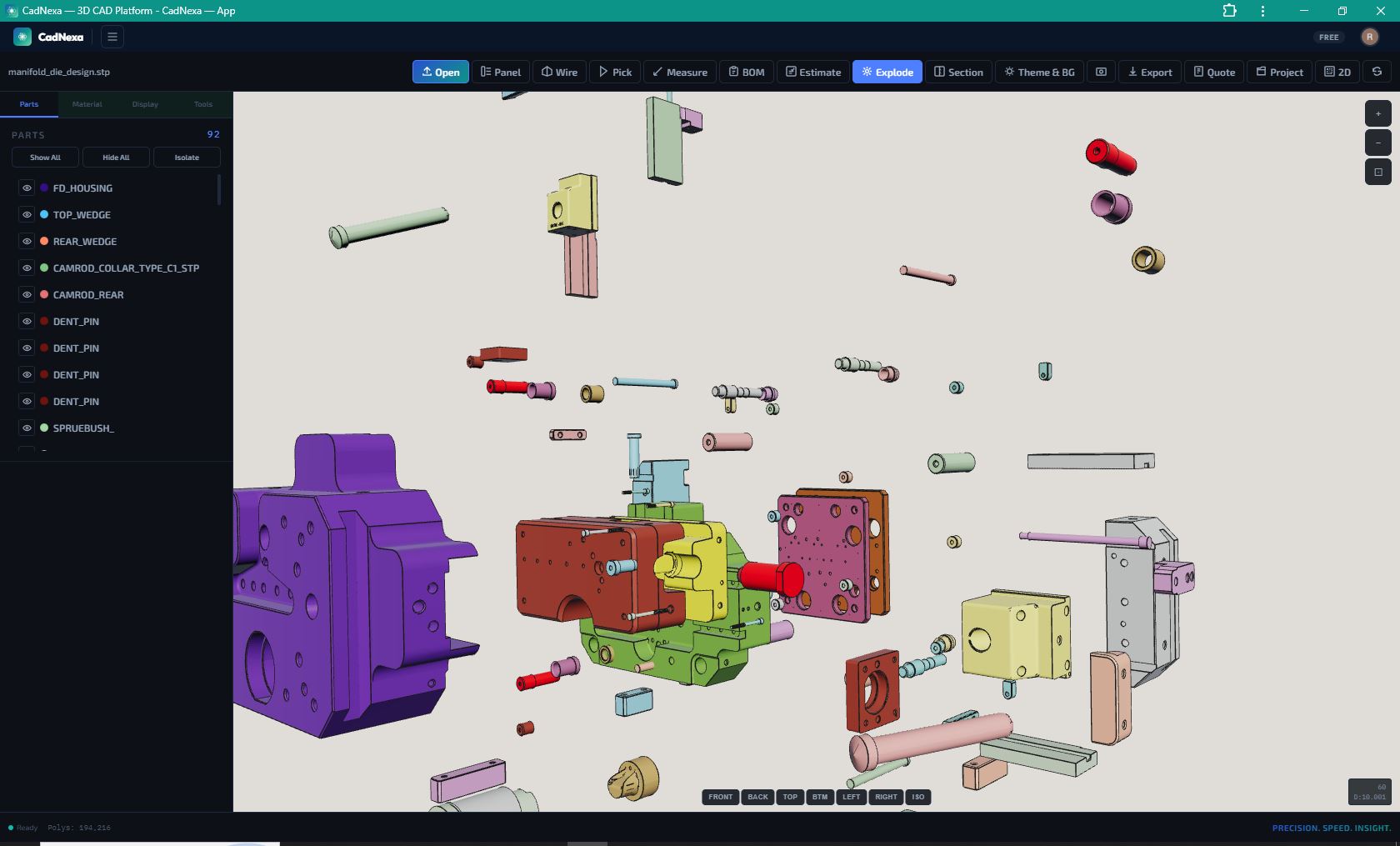
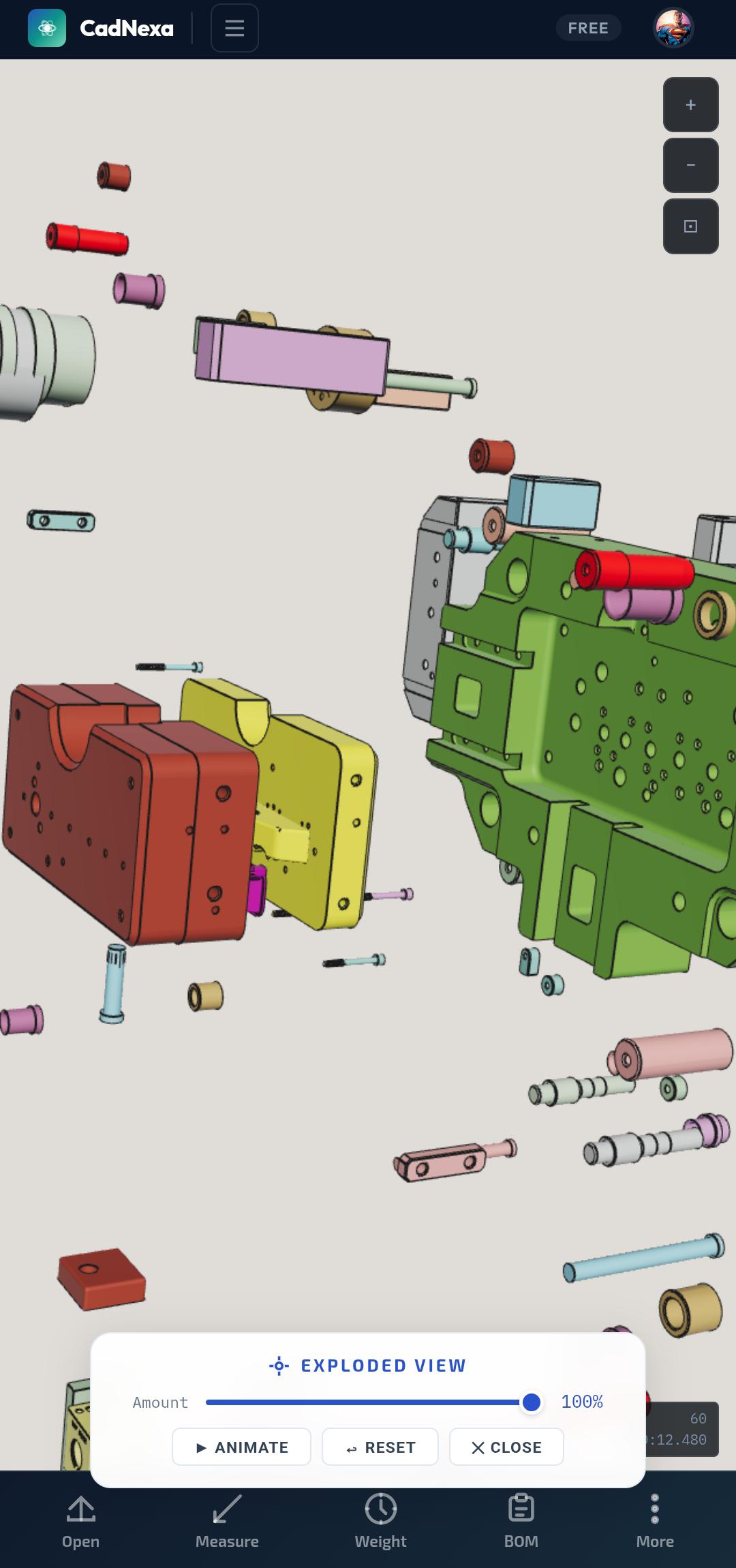
The exploded view feature separates all parts along their assembly axes. You can animate the explosion, adjust the distance, and inspect internal components that are normally hidden inside the assembly. This is invaluable for design reviews, vendor communication, and training new machinists on how an assembly comes together.
Auto-generated Bill of Materials
Every part in the assembly gets its volume calculated automatically. CadNexa includes a database of Indian material prices — SS304, EN8, EN24, MS, aluminum, brass, copper, and more. Assign a material to each part, and the BOM shows individual weight, material cost, and total assembly weight and cost.
For a manufacturing plant head reviewing a new project, this means you can estimate material cost in minutes — not hours. No need to export to Excel, look up densities, calculate volumes manually.
Measurement tools
Click any two points on the 3D model to measure distance. Click a face to measure area. Click an edge to measure length. The measurement tool shows point-to-point, face-to-face, and diameter measurements — all directly on the 3D model in your browser.
Part 2: PDF balloon drawing and FAI report generation
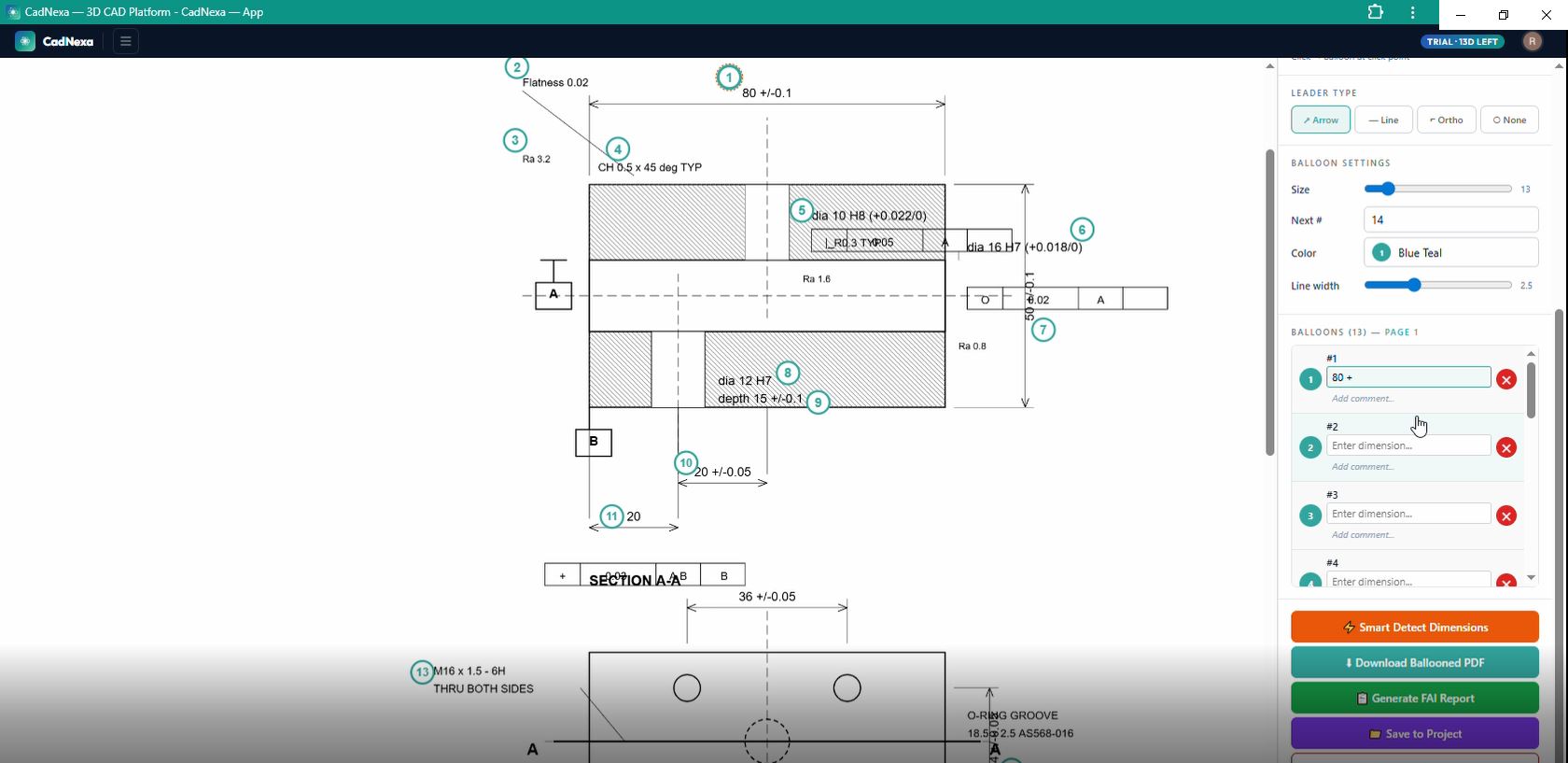
Ballooning is the process of adding numbered circles (balloons) to an engineering drawing, where each balloon points to a specific dimension. These balloons become the basis for first article inspection (FAI) reports — the quality documents that prove your manufactured part matches the design.
Traditionally, engineers use expensive software like InspectionXpert (now Ideagen, ~$2,000/year), QA-CAD (~₹1,19,500 per license), 1factory (~$1,950/year), or DISCUS. Some engineers still print the drawing and add balloon stickers by hand.
CadNexa Balloon Tool: how it works
Upload any PDF engineering drawing — CadNexa renders it at high resolution in your browser. Then choose your ballooning mode:
Click mode: Click anywhere on the drawing to place a balloon. Type the dimension value in the side panel. Fast for simple drawings or scanned PDFs where text can't be auto-detected.
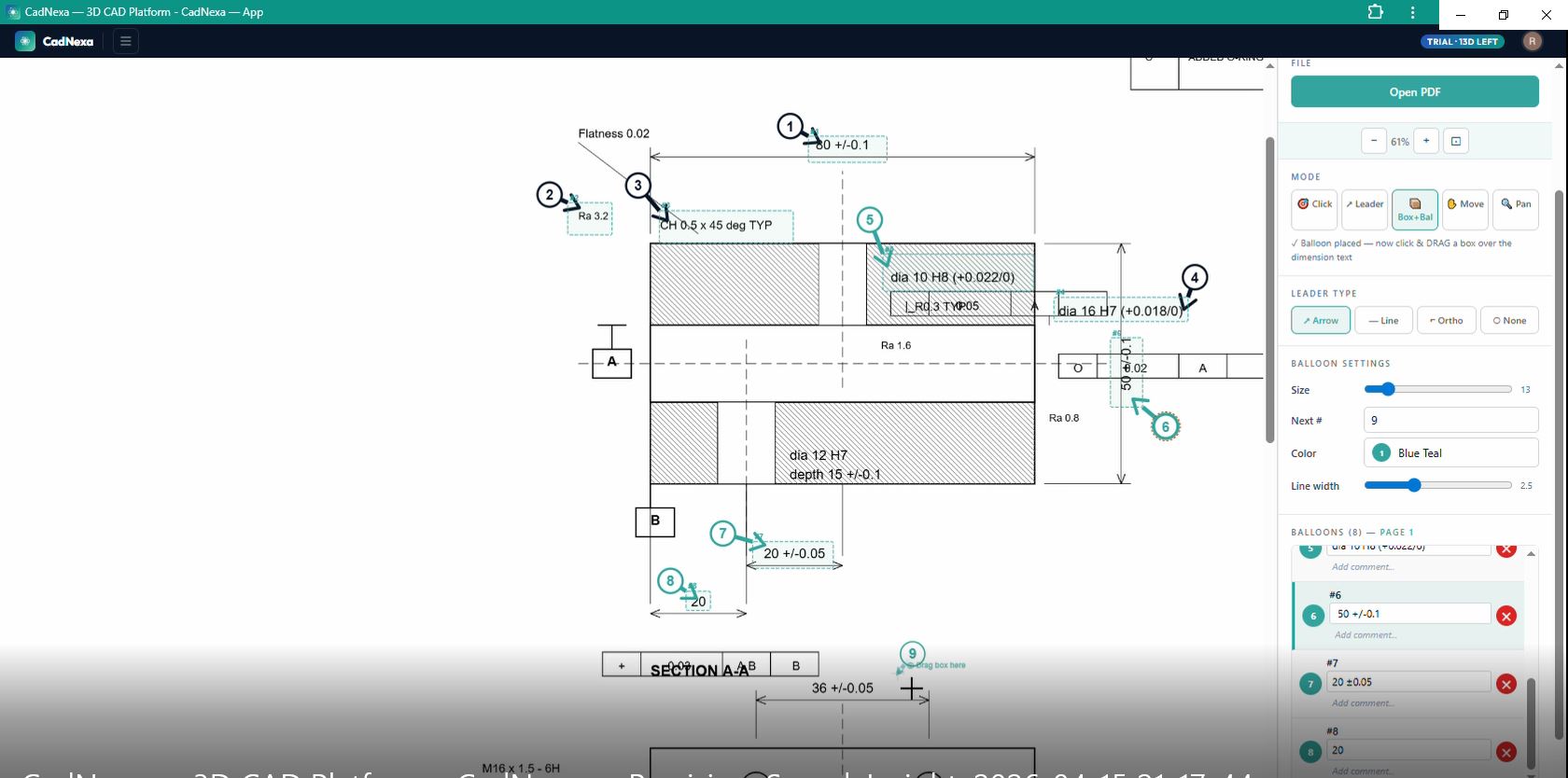
Box+Balloon mode: Place the balloon first, then drag a box over the dimension text. CadNexa's OCR engine reads the text and captures it automatically — including tolerances, GD&T symbols, and notes. This is the fastest method for digital PDFs.
Smart dimension detection
CadNexa doesn't just capture raw text — it parses the dimension intelligently. A captured string like "dia 16 H7 (+0.018/0)" is automatically classified as a diameter dimension with nominal value 16mm, upper tolerance +0.018, lower tolerance 0, fit class H7. This classification drives the FAI report, populating the correct columns for each characteristic.
13 balloon colors and customizable leaders
Choose from 13 balloon colors to distinguish different dimension types — blue for linear, green for diameters, red for critical dimensions. Leader lines come in four styles: arrow, straight line, orthogonal (90° bend), or no leader. Adjust balloon size, line width, and starting number.
FAI report generation
After ballooning, click "Generate FAI Report" and choose your format:
- AS9102 — aerospace standard (Form 3) used by Boeing, Airbus, Rolls-Royce suppliers
- PPAP — automotive standard used by Toyota, Ford, GM, Tata Motors suppliers
- ISO 13485 — medical device inspection report
- Generic — simple inspection report for any industry
The report opens with all balloon numbers, dimensions, tolerances, and characteristic types pre-filled. Add your measurement values, select pass/fail, and export as CSV for integration with your quality management system.
CadNexa vs traditional tools
| Feature | CadNexa (Free) | InspectionXpert / Ideagen | QA-CAD / 1factory |
|---|---|---|---|
| Price | Free / ₹399/mo | ~$2,000/year | ₹1,19,500 or $1,950/yr |
| Installation | None — browser | Desktop software | Desktop software |
| 3D file viewer | Yes — 14 formats | No | No |
| Exploded view | Yes | No | No |
| BOM generation | Yes — with Indian prices | No | No |
| PDF ballooning | Yes | Yes | Yes |
| AS9102 / PPAP | Yes | Yes | Yes |
| Mobile support | Yes | No | No |
| Image support (TIFF/PNG) | Yes | Limited | Yes |
Who is CadNexa for?
CNC shop owners who receive STEP files from customers and need to quickly check dimensions, estimate material cost, and generate quotations.
QA engineers who need to balloon PDF drawings and create AS9102 or PPAP first article inspection reports for aerospace, automotive, or medical device customers.
Purchase managers who need to review 3D models from suppliers without installing CAD software, and who want to compare parts visually.
Design engineers who need to share 3D models with non-CAD users — shop floor supervisors, customers, or vendors — without sending the native CAD file.
Tool room supervisors who check incoming parts against engineering drawings on the shop floor, using their phone or tablet.
File formats supported
3D model formats (CadNexa 3D)
STEP (.step, .stp), IGES (.iges, .igs), BREP (.brep), STL (.stl), OBJ (.obj), PLY (.ply), GLB (.glb), GLTF (.gltf), FBX (.fbx), 3MF (.3mf), DXF (.dxf), DAE (.dae), SAT (.sat), AMF (.amf)
Drawing formats (Balloon Tool)
PDF (.pdf), TIFF (.tif, .tiff), PNG (.png), JPEG (.jpg, .jpeg), BMP (.bmp)
Try CadNexa — free, no login needed
Open a STEP file, balloon a drawing, or generate an FAI report. All in your browser, right now.
Try Demo — No Login Required →Getting started in 60 seconds
- Go to cadnexa.com
- Click "Try Demo — No Login" (or sign in with Google for cloud sync)
- Choose CadNexa 3D to view 3D files, or Balloon Tool for PDF drawings
- Upload your file — STEP, PDF, TIFF, or image
- Start working — measure, balloon, generate BOM, create FAI reports
No credit card. No installation. No trial that expires in 7 days. CadNexa gives you a full 14-day trial with all features unlocked, then a generous free tier that lets you keep using the core tools forever.
Questions? Email support@cadnexa.com · Follow updates on LinkedIn
Related reading: the step-by-step 10-minute FAI report workflow, and what a ballooned drawing is if you are new to inspection documentation.